One of the Sitecore template field types commonly used to select more than one item in a multi-tiered folder structure is the treelist. Though treelists work well by just defining a source path to start at, there are additional parameters that can be used to really tame them to avoid user error from content editors. This article will go over the optional parameters and how they can best be leveraged.
What is a Treelist?
Ahem… ok, back up. First let me quickly explain what a treelist is and how it can be quite useful. A treelist is a multi-select field that allows editors to pick from a tree of items (like the content tree itself). Treelists are useful when editors need the ability to pick more than one item and need to look at items in an n-tier structure (i.e. not on a single axis).
Like other fields types, a treelist can be given a path for its source which will define what item to start at when the field is used in a template. This is nice but it only defines the starting location of the tree — it does not define what sub-items can and cannot be clicked nor does it define what template types to even show.
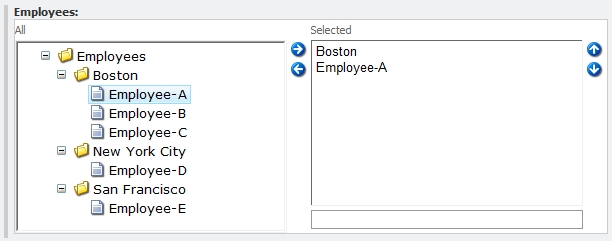
Consider the sample below. Say you want to select employee items into a field but the employees themselves are separated by folders. By just setting a root path content editors can mistakenly select folders in addition to the desired employee items:
Enter treelist parameters…
Treelist Parameters
The optional treelist source parameters are meant to allow data definition titans the ability to specify what editors can do with the treelist.
Parameter Syntax
Treelist parameters are key-value pairs so they’re separated by the “&” and set with the “=” as expected. Also, for any comma-separated values, do not use single or double quotes around the values.
Invalid:
IncludeTemplatesForSelection="landing page", "generic page"
Valid:
IncludeTemplatesForSelection=landing page,generic page
DataSource
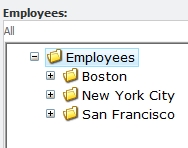
This is like a regular source you would define as a root item to start at. This is literally the root of the tree.
Example:
[csharp]
DataSource=/sitecore/content/home/employees
[/csharp]
DatabaseName
This defines the name of the database to populate the tree with.
IncludeTemplatesForSelection
This is a comma-separated list of template names that should be allowed for selection. If this is defined, only items of templates defined in this list can be selected.
Example:
[csharp]
DataSource=/sitecore/content/home/employees&IncludeTemplatesForSelection=Employee
[/csharp]
ExcludeTemplatesForSelection
This is a comma-separated list of template names that should NOT be allowed for selection. These items may need to appear in the treelist to show sub-items, but these cannot actually be selected.
The example below improves the original example by disallowing folders from selection and thus only allowing editors to select employees:
[csharp]
DataSource=/sitecore/content/home/employees&ExcludeTemplatesForSelection=Folder
[/csharp]
IncludeTemplatesForDisplay
This is a comma-separated list of template names that should be displayed in the treelist. If this is defined, only items of templates defined in this list can be displayed. An important thing to note here is that for any templates in this list, the parent items must at least be displayed in the treelist in order for these to show up.
[csharp]
DataSource=/sitecore/content/home/employees&IncludeTemplatesForDisplay=Employee
[/csharp]
ExcludeTemplatesForDisplay
This is a comma-separated list of template names that should NOT be displayed in the treelist. Any sub-items of these templates will also not display because these are hidden.
IncludeItemsForDisplay
This is a comma-separated list of GUIDs that should be displayed. This is useful to define specific items by their GUIDs.
ExcludeItemsForDisplay
This is a comma-separated list of GUIDs that should NOT be displayed. This is useful to define specific items by their GUIDs.
AllowMultipleSelection
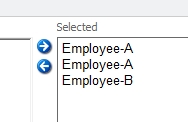
This defines whether or not an editor can select the same item more than once. Interestingly, this is not a boolean but rather the word yes.
Example:
[csharp]
DataSource=/sitecore/content/home/employees&AllowMultipleSelection=yes
[/csharp]
Additional Reading
Hopefully the examples above provides some useful scenarios to understand parameters. Everything I’ve mentioned here is covered in official Sitecore documentation in the Data Definition Cookbook on the SDN. Yan Sklyarenko also has a post on how to validate the source of a treelist which is an excellent tool with all these long obscure source parameters!
Nice post! Some time ago I blogged about how to use field validation to validate the source of the treelist: http://ysdevlog.blogspot.com/2009/03/validating-source-of-treelist.html. You might find it useful 😉
Ahhh, awesome Yan. Very useful. I’ve added a link to your post which I’m sure will definitely come in handy.
Nice, I was actually looking for a way to filter multi select boxes but this is nice to know just as much!
I noticed that it didn’t work on the DropTree field. Not sure if that was just an oversight or what. There’s not a whole lot of uniformity in the datasource for fields. Great article aside from that.
Very nice post Mark! Thank you for sharing!
Great article. Any way to filter what can be selected (not just what can be displayed) by GUIDs?
I’ve got a hierarchy of nodes that are all the same type, but want children of certain nodes to be selectable (not their parents).
If only there were an “ExcludeItemsForSelection” parameter…
Wound up getting around this by creating a custom validator and applying it to the treelist field.
Hi! In Sitecore admin, a treelist it can be consing when selecting an item with the same name under a different parent. Is there any way to display the parent item name along with the selected child item name in the right handside column?
I want to comment on the fact that you cannot use GUIDs to include/exclude templates.
It was supposed to be supported and if you look at the code using Reflector or DotPeek you will see they have written some code for that.
The problem is that they lowercase everything before they add it to the Sitecore query that eventually retrieves the items that are displayed in the ‘selected’ listbox.
Because of that, selection by GUID doesn’t work as they are always uppercase in the Sitecore item XML and thus the query will never match any of them.
This bug has been reported to Sitecore so I except GUID selection to be supported in future releases.
Nice post. Thanks.
Is there anyway multiple items can be selected that have been selected in the treelist in order to sort them?
Thank you very much!Very helpful
how can we run this above query in multisite scenario