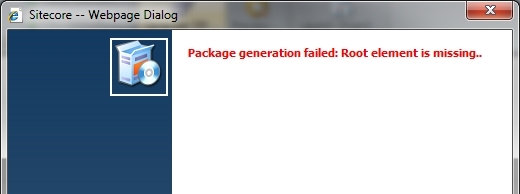
I was recently installing and configuring an existing Sitecore 6.2 solution to do some development. When it came time to package up new templates, media, and content items, Sitecore threw an annoying packager error: “Package generation failed: Root element is missing..” Read on to learn how to fix this issue.
First, here’s a screenshot of the issue in the packager:
My first plan of attack was to check out the Sitecore logs to see what was going on. Surely I would find some sort of stack trace. My problem was that my logs were not being created! Enter my first problem…
Sitecore Logs Will Not Generate
As of late, I’ve been doing a lot of projects built on Sitecore 6.5, so going back to this Sitecore 6.2 instance threw this curve ball. I’m a major proponent of not even touching the standard web.config when you start a new project. I push everyone to adjust configurations with patch include config files instead. The obvious most-used one would be DataFolder.config. When I had setup this Sitecore instance, by nature I set the dataPath in the DataFolder.config. Now, when my logs weren’t being generated, I confirmed the data path was correct. Not only was it set correctly in the patch config, but a quick visit to /sitecore/admin/showconfig.aspx (one of those great admin pages) also rendered the data path that I expected. Perplexed, I decided to overcompensate and I gave the Everyone role on my local machine full read and write access to the data folder, just in case it was a file I/O error. Once again, no logs. Eventually, I found my way to Alex Shyba’s blog and decided to use his technique with Process Monitor to figure out what was going on at the file I/O level. I finally determined that Sitecore was actually writing out logs to the file system, but not to my data path! Well, actually it was my data path… my other data path. It turns out, even though the DataFolder.config file set the data path which I confirmed via my license file and the showconfig.aspx audit, Sitecore was writing logs to the data folder path set in the actual web.config file, which was a separate path on my machine. So, I finally corrected the issue by using the real data path directly in the web.config. Once that change was made, my logs showed up where I expected them. This however still did not solve my packager issue.
Enabling Access to the Windows Temp Folder
Since I was able to finally get Sitecore logs to write to the data folder, I analyzed them and found the main culprit to my packager woes. The application was trying to access the OS temp folder, c:\windows\temp\. The exact lines from the log were:
[sourcecode]
ManagedPoolThread #4 11:41:47 INFO Job started: BuildPackage
ManagedPoolThread #4 11:41:47 ERROR OpenFileStream failed: C:\Windows\TEMP\tmp4F5D.tmp
[/sourcecode]
Access to the temp folder was also a point in the blog post by Alex Shyba as well. I went ahead and gave the app pool identity read/write access to the folder. In my case, that didn’t fix the issue and I needed to give Everyone read/write access. From there, Sitecore’s packager was able to generate a package. It appears that in the process of generating the zip, it needs to access the temp folder during the creating process. I hope this helps anyone else with similar issues.
This fixed my issue. Thanks so much!
You saved my time! thanks.
very help full. you save my times. thanks a lot.
Agreed – this has been a big help today. Thanks!
I’m trying to upload a package and receiving the error. Other developer in my group are able to do it so it’s not a permissions issue on the Sitecore server.
5 years later, this was the correct answer for me too! LOL